About one year ago at work I started work on a project to install a new packing machine where I work.
In my usual carefree fashion, I organised one drawing to do this. Even though I had my newly developed lisp routine to turn on the stuff on the ground floor and freeze the levels above, it proved cumbersome, especially as I was unable at the time to use my favourite: SECTIONPLANE. At one stage, I even created a new empty drawing and xreffed the main drawing into it and used 3DCLIP to get a clearer idea of what was going on.
In the beginning, it was "only" a proposal, so all this was not really that critical. All that mattered was "Would it fit, and in what configuration." Now this is a full on project, things are a lot more critical: you have to know where everything is, and what all clearances are to ensure no surprises on judgement day.
I noticed the engineer in charge did not seem all that happy with the drawings, in that it was hard to visualise some parts due to the fact that some things hide other things, so I have decided to rethink my strategy.
We are now going to have a drawing for each machine, and they will be xreffed into a main drawing which will be mostly just a floor with a reference point in it. Walls and doors will be on one drawing, steelwork on another.
The machine drawings will be in 3D and have all their views, dimensions and annotations in paper space.
Now I am able to use the sectionplane command, there will be one drawing that shows sections, by xreffing in the main drawing to it.
Wednesday, July 25, 2012


Saturday, June 23, 2012
Everybody draws Process and Instrumentation Drawings...don't they?
This just goes on and on. Just when I thought I was nearing half way, the "man" said to me:
"Bill, of course you are doing a Bill of Material for every drawing?"
After picking myself up off the floor after a fainting attack, I replied:
"This will take me centuries!"
Fortunately, I had sort of prior knowledge of this (I appear to filter out unwanted information),
so I had devised a block named "TAG" for valves, motors and so on, and one called "INSTRUMENT" as explained in my March 6th 2012 blog.
Writing a lisp to collect all the tag ones and list them in a text file was pretty easy and went well. You might be asking why did I not use Eattext, a newish command to do exactly this? It is OK, but involves lots of button pressing dialog box travelling.
No, I wanted a one button approach. Silly me. Turns out my dynamic block is a nasty little beast. Do it as per the tag system and it makes a mess of the count.
Searching the net showed me that there are really clever lisp programmers out there, but none had written exactly what I needed.
One came close, a man called Doug Broad, who put up a bare bones solution, using Visual Lisp.
It turns out that Visual Lisp extends ordinary lisp, and allows you to solve such a problem as this.
To use visual lisp in a lisp routine, just type: (vl-load-com). After much frustration, this routine seems to work:
 This is a scrap from a typcial P & ID, the instruments are the ones in bubbles.You can see there are quite a few non-essential lines, and maybe it is not done in slick elegant manner, but it it is relatively easy to follow.
Here is the routine:
;Program written by Bill Le Couteur
;Auckland NZ
;Rev 0 date 24 June 2012
;This program EXTRACTS ALL THE BLOCKS CALLED TAG AND INSTRUMENT
;AND CREATES A TEXT FILE WITH THE ATTRIBUTES
(defun c:PIDE()
;;;this file is the LISTING file
;;;;this makes sure file is empty
(setq scrfile ( open "C:/Bilro/Bilro4/LISTING.TXT" "w"))
(close scrfile)
(setq scrfile ( open "C:/Bilro/Bilro4/LISTING.TXT" "w"))
(setq count 0)
(setq SS1 (ssget "X" (list '(0 . "INSERT") (cons 2 "TAG"))))
(setq no_of_entities ( sslength ss1))
(while (/= count no_of_entities)
(progn
(setq en (ssname ss1 count))
(setq ed (entget en))
(setq the_attrib (entget (entnext en)))
(setq the_tag (dxf 1 the_attrib))
(print the_tag)
(write-line the_tag scrfile)
(setq count (+ count 1))
);end progn
);end while
;;;;;;;;;;;;;;;;;;;;;;;;;NOW TO FIND THE DYMNAMIC BLOCKS CALLED "INSTRUMENT";;;;;;;;;;;;;;;;;;;;;;;;;;;;;;
(vl-load-com)
(setq ss2 (ssget "_X" '((0 . "INSERT"))));;;ESSENTIAL-FIND ALL THE BLOCKS FIRST!!!!!!
(setq no_of_entities (sslength ss2))
(setq count 0)
(setq innercount 0)
(print no_of_entities)
(while (< count no_of_entities)
(progn
(setq obj (vlax-ename->vla-object (ssname ss2 count)))
(setq itsrealname (vla-get-Name obj))
(setq itseffectivename (vla-get-EffectiveName obj))
;(print obj)
;(print itsrealname)
;(print itseffectivename)
;(if (eq itseffectivename "INSTRUMENT")(PRINT "HELLO THERE"))
(setq en (ssname ss2 count))
(setq ed (entget en))
;(print ed)
;;;;;;;;;;INNER WHILE LOOP::::::::::::::::::::::::::-only if its name is "INSTRUMENT"!
(if (eq itseffectivename "INSTRUMENT")
(progn
(while (< innercount 2)
(progn
(setq en (entnext en))
(setq ed (entget en))
(if (eq innercount 0)
(progn
(setq atag (dxf 1 ed))
;(print atag)
);end little if progn
);end little if
(if (eq innercount 1)
(progn
(setq the_no (dxf 1 ed))
;(print the_no)
(setq instrument_tag (strcat atag the_no))
(write-line instrument_tag scrfile)
;(print instrument_tag)
);end little if progn
);end little if
;(print count)
;(print innercount)
;(print ed)
(setq innercount (+ innercount 1))
);end while progn
);end while /= sequend
);END IF PROGN
);END IF
;;;;;;;;;;INNER WHILE LOOP::::::::::::::::::::::::::
(setq innercount 0)
(setq count (+ count 1))
);end while progn
);end while
(close scrfile)
(princ)
)
(defun dxf(code elist)
(cdr (assoc code elist)) ;Finds the association pair, strips 1st element
);defun
"Bill, of course you are doing a Bill of Material for every drawing?"
After picking myself up off the floor after a fainting attack, I replied:
"This will take me centuries!"
Fortunately, I had sort of prior knowledge of this (I appear to filter out unwanted information),
so I had devised a block named "TAG" for valves, motors and so on, and one called "INSTRUMENT" as explained in my March 6th 2012 blog.
Writing a lisp to collect all the tag ones and list them in a text file was pretty easy and went well. You might be asking why did I not use Eattext, a newish command to do exactly this? It is OK, but involves lots of button pressing dialog box travelling.
No, I wanted a one button approach. Silly me. Turns out my dynamic block is a nasty little beast. Do it as per the tag system and it makes a mess of the count.
Searching the net showed me that there are really clever lisp programmers out there, but none had written exactly what I needed.
One came close, a man called Doug Broad, who put up a bare bones solution, using Visual Lisp.
It turns out that Visual Lisp extends ordinary lisp, and allows you to solve such a problem as this.
To use visual lisp in a lisp routine, just type: (vl-load-com). After much frustration, this routine seems to work:

Here is the routine:
;Program written by Bill Le Couteur
;Auckland NZ
;Rev 0 date 24 June 2012
;This program EXTRACTS ALL THE BLOCKS CALLED TAG AND INSTRUMENT
;AND CREATES A TEXT FILE WITH THE ATTRIBUTES
(defun c:PIDE()
;;;this file is the LISTING file
;;;;this makes sure file is empty
(setq scrfile ( open "C:/Bilro/Bilro4/LISTING.TXT" "w"))
(close scrfile)
(setq scrfile ( open "C:/Bilro/Bilro4/LISTING.TXT" "w"))
(setq count 0)
(setq SS1 (ssget "X" (list '(0 . "INSERT") (cons 2 "TAG"))))
(setq no_of_entities ( sslength ss1))
(while (/= count no_of_entities)
(progn
(setq en (ssname ss1 count))
(setq ed (entget en))
(setq the_attrib (entget (entnext en)))
(setq the_tag (dxf 1 the_attrib))
(print the_tag)
(write-line the_tag scrfile)
(setq count (+ count 1))
);end progn
);end while
;;;;;;;;;;;;;;;;;;;;;;;;;NOW TO FIND THE DYMNAMIC BLOCKS CALLED "INSTRUMENT";;;;;;;;;;;;;;;;;;;;;;;;;;;;;;
(vl-load-com)
(setq ss2 (ssget "_X" '((0 . "INSERT"))));;;ESSENTIAL-FIND ALL THE BLOCKS FIRST!!!!!!
(setq no_of_entities (sslength ss2))
(setq count 0)
(setq innercount 0)
(print no_of_entities)
(while (< count no_of_entities)
(progn
(setq obj (vlax-ename->vla-object (ssname ss2 count)))
(setq itsrealname (vla-get-Name obj))
(setq itseffectivename (vla-get-EffectiveName obj))
;(print obj)
;(print itsrealname)
;(print itseffectivename)
;(if (eq itseffectivename "INSTRUMENT")(PRINT "HELLO THERE"))
(setq en (ssname ss2 count))
(setq ed (entget en))
;(print ed)
;;;;;;;;;;INNER WHILE LOOP::::::::::::::::::::::::::-only if its name is "INSTRUMENT"!
(if (eq itseffectivename "INSTRUMENT")
(progn
(while (< innercount 2)
(progn
(setq en (entnext en))
(setq ed (entget en))
(if (eq innercount 0)
(progn
(setq atag (dxf 1 ed))
;(print atag)
);end little if progn
);end little if
(if (eq innercount 1)
(progn
(setq the_no (dxf 1 ed))
;(print the_no)
(setq instrument_tag (strcat atag the_no))
(write-line instrument_tag scrfile)
;(print instrument_tag)
);end little if progn
);end little if
;(print count)
;(print innercount)
;(print ed)
(setq innercount (+ innercount 1))
);end while progn
);end while /= sequend
);END IF PROGN
);END IF
;;;;;;;;;;INNER WHILE LOOP::::::::::::::::::::::::::
(setq innercount 0)
(setq count (+ count 1))
);end while progn
);end while
(close scrfile)
(princ)
)
(defun dxf(code elist)
(cdr (assoc code elist)) ;Finds the association pair, strips 1st element
);defun
Saturday, April 14, 2012
Process and Instrumentation Diagrams (PIDs)...but wait ...there's more!

Hmfff.....looks like I was wrong thinking 1.5mm high text was a good idea.
It so happened that one of our electrical engineers has just had an eye operation and was having an awful time trying to read my drawings.
I realised they would have to be changed to 2mm high, which a huge nuisance as I have done quite a few drawings.
Just to add to the fun, it appears that the requirement is for each sheet to show mainly just one item, so a drawing might only have one tank, with it's associated piping and pumps. So the emphasis is still on systems, just at a finer level.
The drawings I had done were not wasted, as they became the detailed PROCESS FLOW DIAGRAMS. Some upside to this as I have a bad habit of trying to squeeze too much onto one drawing usually.
I have started on a lisp routine to deal to errant drawings: it is called FIX.lsp. When it is up and running I will post it.
In the meantime, in a rush of enthusiasm that has just evaporated, I have just gotten the skeleton of a routine together that should make PID drudgery a little easier.
The idea of the routine, called ADTAGS.lsp, is that you have done all the graphical elements of your drawing, that is you have drawn all the valves and pipelines in, and you now wish to add tags to all the items in the drawing. For instance you may have 3 manual valves, and you want to label them with tags, HV001,HV002 and HV003, as per the picture above.
Here is the routine, which is obviously far from finished:
;Program written by Bill Le Couteur
;Auckland NZ
;Rev 0 date 14-4-12
;This program adds tag numbers to a bunch of blocks
;only works for blocks named "VALVE MANUAL" at the moment
(defun c:ADTAGS()
(setq count 0)
(setvar "attdia" 0); turns off the dialog box you get when issuing ate commmand
(setq ss1 (ssget "X" '(( 0 . "INSERT")( 2 . "VALVE-MANUAL")) ))
;gets a selection set of the whole drawing, filtering for the block we want
(setq the_no_of_members(sslength ss1))
;how many members in the selection set?
;;;;;LOOP THROUGH THE SELECTION, GETTING POSITION INFO AND USING THIS TO
;;;;;SET THE INSERTION POINTS;;;;;;;;;;;;;;;;;;;;;;;;;;;;;;;
(while (< count the_no_of_members)
(progn
(setq en (ssname ss1 count))
(setq edata (entget en))
(setq theposn(cdr(assoc 10 edata)))
(setq the_x (car theposn))
(setq the_x ( - the_x 5))
(setq the_y (cadr theposn))
(setq rot (cdr (assoc 50 edata)))
(if (eq rot 0)(setq the_tagy (+ the_y 4)))
(if (/= rot 0)(setq the_tagy (- the_y 1.5)))
(if (/= rot 0)(setq the_x ( + the_x 9)))
(setq counts (itoa count))
(if (eq rot 0)(setq the_tag (strcat "HV00" counts)))
(if (/= rot 0)(setq the_tag (strcat "HV00" counts)))
(command "-insert" "tag" (list the_x the_tagy) "1" "1" "0" the_tag)
(setq count ( + count 1));add one to the counter to keep the loop going
);end while progn
);end while
(setvar "attdia" 1);turns on the dialog box you get when issuing ate commmand
(princ)
)
Friday, March 30, 2012
Rough Visualising of ideas
We have a man at our work who has an infectious enthusiasm for new ways of creating electricity.
Much fun has been had proposing all sorts of wild schemes involving kites and so on. I have a digital camera that can take movies, so I decided to experiment with it to present one of my ideas. A patent search revealed some similar ideas, but not precisely this one. I'm not sure on the business with patents, but I think that seeing as this idea is now out in the wild, no one can patent it.
It would be nice if someone with a bit of money and enthusiasm picked it up and ran with it.
The idea is very simple. You have a series of windmills, held aloft by a balloon, but they are better than a similar size at ground level, because the winds are faster the higher you go.
Much fun has been had proposing all sorts of wild schemes involving kites and so on. I have a digital camera that can take movies, so I decided to experiment with it to present one of my ideas. A patent search revealed some similar ideas, but not precisely this one. I'm not sure on the business with patents, but I think that seeing as this idea is now out in the wild, no one can patent it.
It would be nice if someone with a bit of money and enthusiasm picked it up and ran with it.
The idea is very simple. You have a series of windmills, held aloft by a balloon, but they are better than a similar size at ground level, because the winds are faster the higher you go.
Tuesday, March 6, 2012
Process and Instrumentation Diagrams (PIDs)

Yes, again.
Just some added light. The above is a snip of one of my drawings using our new methods. We are in the process of trying to sort all our ones up to a reasonable standard, so I have had a talked with a man from Denmark I work with, and he has come up with some good ideas:
1. Tag numbers should have the form of AV007, or PM126, which would stand for Actuated Valve and Pump Motor respectively. The reason for the XX000 format is this allows for up to 100 items in the one area.
2. The temptation is to make PIDs based on an area, but it is better to make them on a process basis. This means a drawing could have a tank in one building with a pipe leading to another.
These processes would have an overall name, and number, which would be the drawing number.
So for instance you might have a drawing/file number like "PID-014-Carbonitation.dwg".
Therefore a tag in that drawing might be AV007, but it's true unique tag would be 014-AV007.
3. The idea is to keep the drawings as clutter free as possible, and to this end, arrows are not permitted, except if you are desperate! Also on the no-go list are temperatures, flow rates, motor kWs and other fluff. That fluff can go on the Flow Diagram or if need be a separate layout.
My ideas on the drafting are:
1. All text to be 1.5mm high. For mechanical drawings I use 2mm. Just need to squeeze that extra bit on!
2. All ordinary items (eg lines) to be on the med layer. I use the name med as short for medium line weight. I normally have this as set to yellow, but maybe if things needed to be printed in colour, then it might not be so clever. I have a colour ctb that prints yellow as black.
3. All viewports to be of scale 1:1.
4. All tag numbers to have their own layer, these layer sets are available in the template drawing and as a lisp routine to create the layer set. The reason for this is to be able to isolate the numbers so you can check them quickly to see if you have duplicated any.
5. Most of the symbols are to Iso standard 10628, in other words, a world standard.
6. The Tags to have their own block, which consists of the attribute only, no lines.
7. Instrument tags have their own circle and so on with two tags, as a dynamic block allowing the same block to be used in all 4 orientations. Handy when you want to extract data!
8. All items to be in model space. This allows for more than one layout, say for instance if you need one showing flow rates. The flow rates would end up in paper space.
I know people that use a grid to do PIDs, and I have tried this but found the whole process of turning snaps on and off all the time irritating.
My web page bilrocad.com was due to die about February 2012, but Blue Host, the provider, stayed the execution for another year, so I am going to try and make it a little more easy on the eye, as it looks very rough at the moment.
All this between getting another blog going for a Flying Boat (see the new link on the right)-
I have had a struggle getting the book reading bit going, but it is up and running now-see "A Noble Chance" on Friends of the Solent Flying Boat.
Monday, January 2, 2012
Just a few renders...
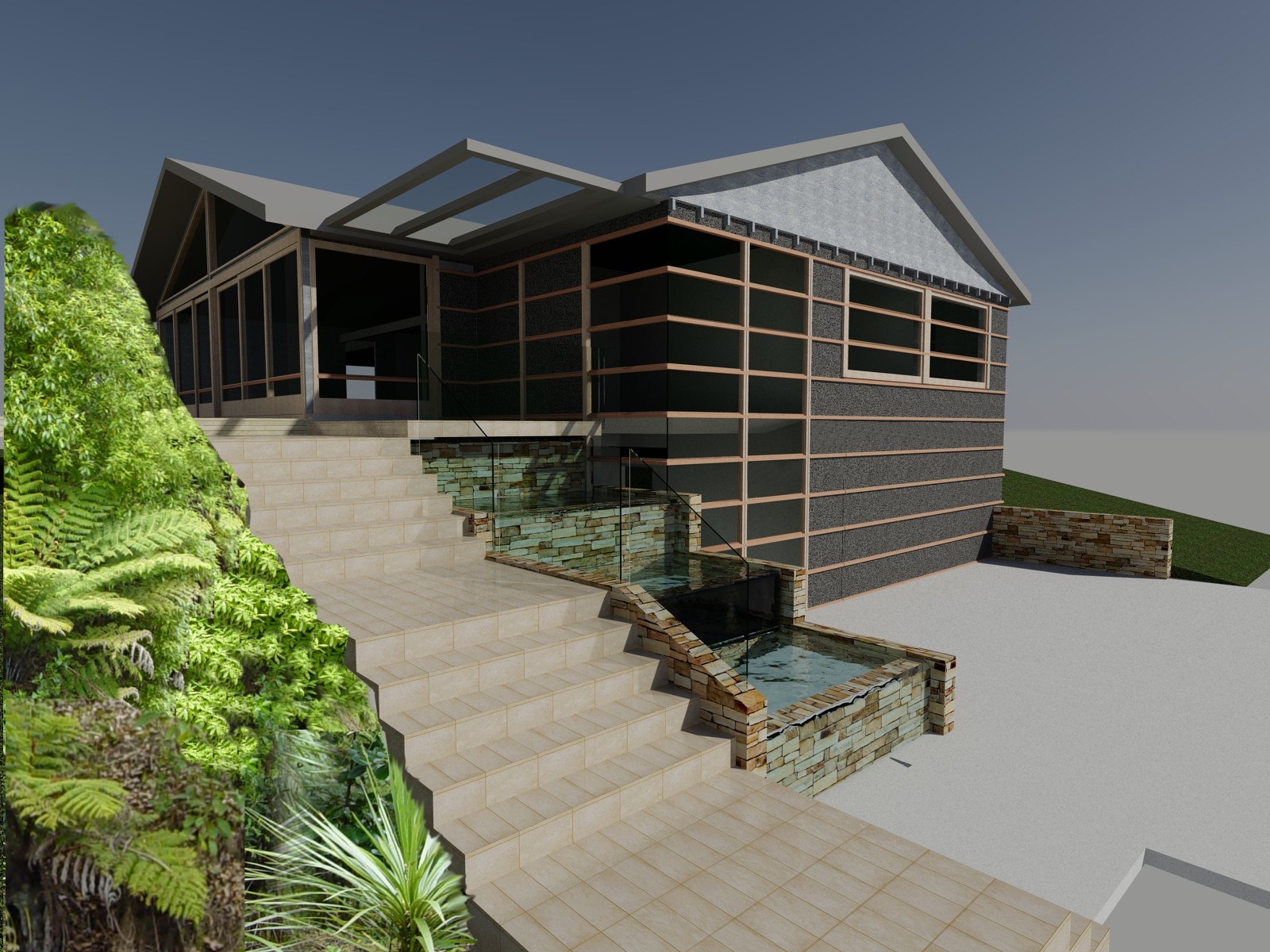
What you see here is the result of a bit of experimentation. With Autocad the trick is to make sure LIGHTINGUNITS is set to either 1 or 2 and that you have sky background and illumination selected. It also pays to open the Advanced Render settings and make sure Final Gather is ON. The foliage in the foreground was cut and pasted in afterwards in Photopaint.
No Sky needed in the night shot but it seems it stayed on anyway!
These are a friend's design, the first is a renovation of the front of an existing house and the second is a bachelor pad, to go in a large backyard. The first one has scorched weatherboards.
Apparently this protects the wood for about 80 years.


No Sky needed in the night shot but it seems it stayed on anyway!
These are a friend's design, the first is a renovation of the front of an existing house and the second is a bachelor pad, to go in a large backyard. The first one has scorched weatherboards.
Apparently this protects the wood for about 80 years.


Saturday, December 10, 2011
Sheetmetal developments and PIDs

This might be handy for some: How to make a flat sheet metal pattern from a 3D solid in Autocad?
Well, as far as I know, it does not do it out of the box, unlike Inventor or Solidworks. I do not have these so I have to manage somehow.
Normal transitions can be done using 3rd party programs that do that sort of thing. Unfortunately, these do not handle special cases like the round outlet being on an angle, as well as being offset.
Back to basics: just draw the object in 3D and draw a series of lines in 3D to represent the folds that you want. If your metal thickness is 3mm, you would offset everything in 1.5mm ie half, in from the outside of the finished product.
Sounds easy? It is. Sadly it is extremely time consuming and tiresome. This is where some Lispy tricks come in handy, and while it does not do the full job, it does help.
First, to draw a transition, draw a rectangle, then a circle somewhat higher. You then use the loft command to produce the 3d solid. Now it pays to change to a different layer and draw the midlines, ie those ones halfway in as mentioned above. So, for instance you would draw a rectangle on top of the original one and offset it by 1.5mm if your metal thickness was 3mm.
same for the circle. You may need to hide the original solid to get the offset command to work.
If your circle was parallel to the rectangle, you could now issue the divide command and pick the circle and divide it into 48 pieces. You will see that nothing appears to have happened after the divide command. This is now the time to change your OSNAP to endpoint, intersection and node. This last one is important because it will pick up all the nodes (points) that were put in and that you cannot see as yet.
Issue the line command and hover over parts of your circle- you should see the nodes light up as the mouse passes over them.
Draw in your development lines-this takes a while. Now you find out the length of the small arc,ie the bit between two of the nodes. This can be done by copying the circle and the nodes off a little bit an putting in some lines to the nodes and then trimming off the circle, leaving an arc.

Right click on the arc and select Properties, it will give you an arc length. Write this down.
Call it Length A.


Next, start on the development, usually handy to the 3D part so you can see both at the same time. The rectangular part edge is the best place to start. You will see that there is a triangle, and the lengths of the sides are easily found through their properties, so after drawing one side, draw two circles the radii of which are these lengths. Now draw two lines from each end of the original line to where the two circles cross. Erase the circles and you are now started.
To get the part that has all the little creases, you need to do the same again, but for one of the sides of the triangle you use length A as mentioned above. All the while you are building on the original triangle. Normally, a transition gets welded up the middle so normally half has to be drawn (or a quarter if it is symmetrical).
My lisp routine (available free if anyone is interested) allows you to pick the 3d line, then it draws a circle with the radius information from that line, which does speed things up a tiny bit.
A nice finishing touch is to put 0.5mm radius circles on every intersection around the circle and then trim them out so they appear as notches. This is so the sheetmetal guy does not have to divide them out - he just folds using the notches.

Next a bit on PIDs (Process and Instrumentation Diagrams)
 If you have done any of these, you know 3 things:
1. Lines are nice to draw first, and blocks are ok to put in a drawing, but these ones always land on lines, so the inner bits have to be trimmed out.
2. There are lisp routines around that do autobreaking of the lines, but this has to be organised or downloaded or paid for. If, like me, you only do PIDs about 10% of the time, you might not bother. (Maybe I should!)
3. Autodesk make an add-on to Autocad, specifically to do PIDs. Unfortunately at NZ$3500 to upgrade from standard Autocad, and an extra NZ$300 a year this is not liable to be on the menu any time soon.
So along came one of my ideas that even I have my doubts will catch on: what if you could do a drawing just by pressing keys on your keyboard? Turns out you cannot use the arrow keys, but the rest of the keyboard is available, using a lisp routine (see below). Just issue the command PID, pick your start point, press the "o" key (make sure caps lock is OFF!) and up the line goes by 6mm. Press "l" key and off to the right it goes by 6mm. Now press 4 on the keypad-and a manual valve is inserted. Press 5 and an actuated valve is put in. "k" is to go left and "," is used to go down.
The routine uses the autcad lisp function grread - short for graphics read, which also does the keyboard. In my research trying to understand this I realised that my level of writing lisp is very low level and basic....Anyway, it does work. You could cut and paste the following code into notepad and save it as PID.lsp.
Whoops! Stop press....just tried the routine below at work and found that HP keyboards seem to have a different mapping right is 76, left is 75, up is 79. Strangely, down is still 44. Go figure.
Stop press yet again. Just realised that if you have caps lock on, then the above is the way to go.
If caps lock off, then the stuff below is OK!
;THIS DRAWS A LINE WITH VALVES FOR A PID
;BY BILL LE COUTEUR 2011
(defun C:PID()
(setq initial_point (getpoint "Pick a start Point\n"))
(setq the_x (car initial_point))
(setq the_y (cadr initial_point))
(print the_x)
(print the_y)
(while (setq the_input (grread 1 5 2))
(progn
(if (eq (car the_input) 2)
(progn
(setq key_press (cadr the_input))
(print the_input)
(print key_press)
(print initial_point)
(print the_new_point)
(if (eq key_press 108) ;to the right
(progn
(setq the_x_right ( + the_x 6))
(command "_line" (list the_x the_y) (list the_x_right the_y) "")
(setq the_orient "right")
(print "x,xright,y")
(print the_x)
(print the_x_right)
(print the_y)
(setq the_x ( + the_x 6))
);end 108 progn
);end 108 if
(if (eq key_press 107) ;to the left
(progn
(setq the_x_left ( - the_x 6))
(command "_line" (list the_x the_y) (list the_x_left the_y) "")
(setq the_orient "left")
(setq the_x ( - the_x 6))
);end 107 progn
);end 107 if
(if (eq key_press 111) ;up
(progn
(setq the_y_up ( + the_y 6))
(command "_line" (list the_x the_y) (list the_x the_y_up) "")
(setq the_orient "up")
(print "y,y-up,x")
(print the_y)
(print the_y_up)
(print the_x)
(setq the_y ( + the_y 6))
);end 111 progn
);end 111 if
(if (eq key_press 44) ;down
(progn
(setq the_y_down ( - the_y 6))
(command "_line" (list the_x the_y) (list the_x the_y_down) "")
(setq the_orient "down")
(setq the_y ( - the_y 6))
);end 44 progn
);end 44 if
;--------------------INSERTING VALVE MANUAL-----------------------------
(if (and (eq key_press 52) (eq the_orient "right")) ;valve manual to the right
(progn
(command "-insert" "vmr" (list the_x the_y) "1" "1" "0")
(setq the_x ( + the_x 6))
);end 52 progn
);end 52 if
(if (and (eq key_press 52) (eq the_orient "left")) ;valve manual to the left
(progn
(command "-insert" "vml" (list the_x the_y) "1" "1" "0")
(setq the_x ( - the_x 6))
);end 52 progn
);end 52 if
(if (and (eq key_press 52) (eq the_orient "up")) ;valve manual to the up
(progn
(command "-insert" "vmr" (list the_x the_y) "1" "1" "90")
(setq the_Y ( + the_Y 6))
);end 52 progn
);end 52 if
(if (and (eq key_press 52) (eq the_orient "down")) ;valve manual to the down
(progn
(command "-insert" "vmr" (list the_x the_y) "1" "1" "-90")
(setq the_Y ( - the_Y 6))
);end 52 progn
);end 52 if
;--------------------END OF INSERTING VALVE MANUAL-----------------------------
;--------------------INSERTING NON-RETUN VALVE FORWARD -----------------------------
(if (and (eq key_press 49) (eq the_orient "right")) ;to the right
(progn
(command "-insert" "VNFR" (list the_x the_y) "1" "1" "0")
(setq the_x ( + the_x 6))
);end 49 progn
);end 49 if
(if (and (eq key_press 49) (eq the_orient "left")) ;to the left
(progn
(command "-insert" "VNFL" (list the_x the_y) "1" "1" "0")
(setq the_x ( - the_x 6))
);end 49 progn
);end 49 if
(if (and (eq key_press 49) (eq the_orient "up")) ; to the up
(progn
(command "-insert" "VNFR" (list the_x the_y) "1" "1" "90")
(setq the_Y ( + the_Y 6))
);end 49 progn
);end 49 if
(if (and (eq key_press 49) (eq the_orient "down")) ; to the down
(progn
(command "-insert" "VNFR" (list the_x the_y) "1" "1" "-90")
(setq the_Y ( - the_Y 6))
);end 49 progn
);end 49 if
;--------------------END OF INSERTING VALVE MANUAL-----------------------------
;--------------------INSERTING VALVE ACTUATED-----------------------------
(if (and (eq key_press 53) (eq the_orient "right")) ;valve to the right
(progn
(command "-insert" "var" (list the_x the_y) "1" "1" "0")
(setq the_x ( + the_x 6))
);end 53 progn
);end 53 if
(if (and (eq key_press 53) (eq the_orient "left")) ;valve to the left
(progn
(command "-insert" "val" (list the_x the_y) "1" "1" "0")
(setq the_x ( - the_x 6))
);end 53 progn
);end 53 if
(if (and (eq key_press 53) (eq the_orient "up")) ;valve to the up
(progn
(command "-insert" "var" (list the_x the_y) "1" "1" "90")
(setq the_Y ( + the_Y 6))
);end 53 progn
);end 53 if
(if (and (eq key_press 53) (eq the_orient "down")) ;valve to the down
(progn
(command "-insert" "var" (list the_x the_y) "1" "1" "-90")
(setq the_Y ( - the_Y 6))
);end 53 progn
);end 53 if
;--------------------END OF INSERTING VALVE ACTUATED-----------------------------
;--------------------INSERTING VALVE CONTROL-----------------------------
(if (and (eq key_press 54) (eq the_orient "right")) ;valve to the right
(progn
(command "-insert" "vcr" (list the_x the_y) "1" "1" "0")
(setq the_x ( + the_x 6))
);end 54 progn
);end 54 if
(if (and (eq key_press 54) (eq the_orient "left")) ;valve to the left
(progn
(command "-insert" "vcl" (list the_x the_y) "1" "1" "0")
(setq the_x ( - the_x 6))
);end 54 progn
);end 54 if
(if (and (eq key_press 54) (eq the_orient "up")) ;valve to the up
(progn
(command "-insert" "vcr" (list the_x the_y) "1" "1" "90")
(setq the_Y ( + the_Y 6))
);end 54 progn
);end 54 if
(if (and (eq key_press 54) (eq the_orient "down")) ;valve to the down
(progn
(command "-insert" "vcr" (list the_x the_y) "1" "1" "-90")
(setq the_Y ( - the_Y 6))
);end 54 progn
);end 54 if
;--------------------END OF INSERTING VALVE CONTROL-----------------------------
);end if progn
);end if
);end progn
);end while
);end func
Subscribe to:
Posts (Atom)